
The main function currently performed by the smart alarm program shows the current local time (hours and seconds). Manually set the ringing time (hours and seconds). Quick set the ringing time. Displays the remaining time...
Smart Alarm Clock
Main functions currently implemented by the program
Displays the current local time (hours, minutes and seconds).
Manually set the ring time (hours, minutes and seconds).
Quickly set the ring time.
Displays the remaining time (hours, minutes and seconds).
The alarm clock vibrates and rings.
Terminate the set alarm clock.
Select background music.
Listen to background music.
Stop listening.
Change the background image of the alarm clock interface.
Introduction to main function implementation methods
- A GUI for alarm users: Graphical interface design using Java GUI programming toolkits Swing and AWT. The main controls used are Java Swing Jmenubar, Jmenu, JmenuItem, JLable, JButton, Timer and JComboBox.
- Displays local time: Use the Calendar abstract category to access local time and use the GetInstance() method to create objects. The local time is then converted to the required format by the SimpleDateFormat class.
- Set the bell time: Manually set the bell time to allow the user to choose the time required by three JComboBox, and when the user selects the fixed time by pressing box, the time selected by the user getsHour(), GetMunite(), GetSecond(). Automatically set bells are set through six JButtons in the user interface, with six JButtons in order: one minute, five minutes, 30 minutes, one minute, five minutes, and 30 minutes (all based on current time). When the user presses the key, the corresponding number will be entered in the ddActionListener (this).
- Select background music, listen to background music, and stop auditioning: Users select background music (with a music format of .wav) to be stored in a folder in advance through JComboBox, and when users click on the test button, a new thread will be created through Thread() and the thread will be started using the Star() method to start the music. When users click the stop button, the interrupt() method will stop the thread and stop playing the music.
public void myListener() {
New Thread(new Runnable(){// Set a thread
public void run() {
while (true) {
try {
Thread.sleep(1000);
} catch (Exception e) {
e.printStackTrace();
}
executeSund();// Play sound
}
}
}).start();
}
- Alarm function: When the user sets the ringing time and selects the background music, the system creates a thread that captures the current time and result.setText (surplus time) by now.setText (now()) and displays it in a graphical interface using Timer to update the current and remaining time in real time. When local time corresponds to the preset alarm time, i.e. the remaining time is zero, the graphical interface shows " Oh the time has arrived " , while the pre-created music-playing circuit execute Sound() starts, starts playing background music, while the vibration function is achieved by real-time changes in the graphical coordinates.
public void timeListener() {
New Thread(new Runnable(){// Set a thread
public void run() {
while (true) {
try {
Thread.sleep(1000);
} catch (Exception e) {
e.printStackTrace();
}
initMainPanel();
Now.setText(now());//get system time
Result.setText (surplus time());// get leftover time
}
}
}).start();
}
- Change background pictures: When the user clicks to replace the background picture, the system automatically takes the next picture from the folder, uploads it and updates it to Panel and displays it.
private void changeBG() {
setFlagOfBackground(true);
if (background < AlarmBackground.getBackgroundListSize()) {
iconed = true;
setVisible(false);
if (background != AlarmBackground.getBackgroundListSize() - 1) {
++background;
} else {
background = 0;
}
initMainPanel();
}
}
Operation renderings
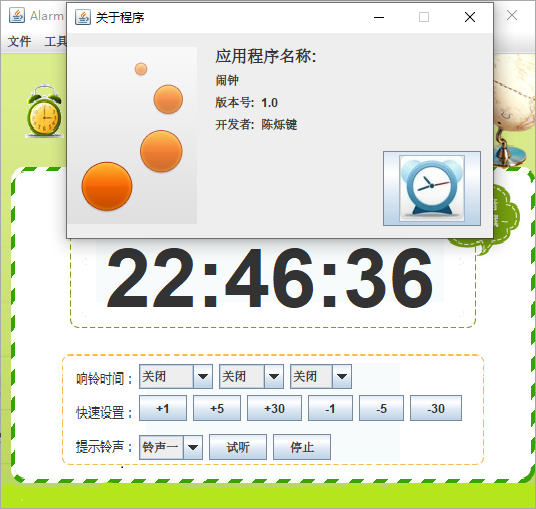
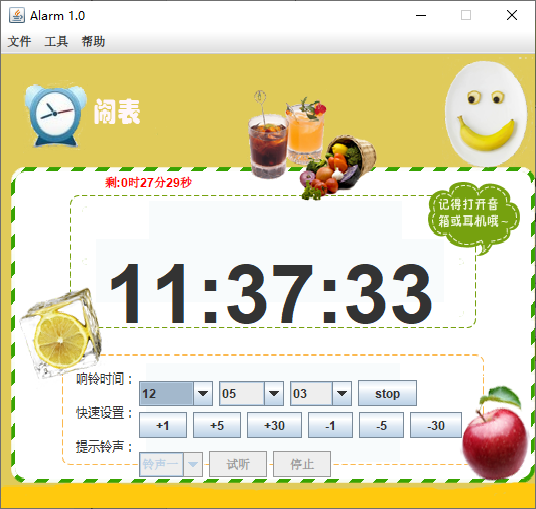
Overall function